


Showing posts with label marketing. Show all posts
Showing posts with label marketing. Show all posts
I love this...
Another Etsy seller who is absolutely wonderful, was kind enough to share findings the other day. The program she found is called Animoto.
What is Animoto?
- It is a program that produces TV-quality music videos using your photos in just minutes.
How does it work?
- Choose your photos (about 20)
- Upload your photos to the program (very similiar to uploading photos to your Etsy listings).
- Choose a song.
- Click complete.
The program puts everything together and VOILA, you've just created your first absolutely fabulous 30 second video!
But what does it cost me?
- Well, if you know me, you know that I love free! So, of course this program is absolutely FREE!
What do I do with it now?
- I'm in the process of looking for places that I can advertise add my new video. So far, I've found Flickr, YouTube, Facebook fan page, and my blog but I'm still searching!
So go forth and create!


Go Daddy + Facebook = $50 free ad credit!

I've been humming and hawing about purchasing advertising on Facebook, I've been heard great success stories and horrible flops! Someone mentioned how they received a free Facebook ad credit and since then, I figured I would wait until another ad credit popped up and it finally did!
If you purchase a domain name through Go Daddy for $9.99, you can receive a $50 Facebook ad credit!
Expiry: September 30, 2009
Tip: Even if you aren't thinking about starting up a website, you can just simply redirect to your Etsy site or you can make sure you have it available for future use!
TERMS & CONDITIONS: The promotional credit must be applied to a new Facebook Advertiser account within 15 days of creating such account and is valid only for purchase of advertising through Facebook's online advertising system in the United States, Canada, United Kingdom and Australia. May only be redeemed by Facebook users who purchase Go Daddy qualifying products. Advertisers will be charged for advertising that exceeds the promotional credit. Advertisers will need to suspend their ads if they do not wish to receive additional charges beyond the free credit amount. Subject to ad approval, valid registration and acceptance of the generally applicable Facebook Advertising Terms and Conditions. The promotional credit is non-transferable and may not be sold or bartered. Offer may be revoked at any time for any reason by Facebook. One promotional credit per individual. Promotional credit equals $50.00 USD which can be applied to the purchase of advertising through Facebook's online advertising system. A $1.00 activation fee is charged separately. Offer valid only for sign ups using the code or URL link received upon purchase of Go Daddy shared hosting, virtual/dedicated hosting, WebSite Tonight®, Quick Shopping Cart®, Quick Blogcast - all plans qualify. Expires 90 days from date the customer sets up their account with Facebook. Should you purchase more than one Go Daddy product that qualifies for the above offer, you will receive the highest eligible credit value. Subsequent purchases do not qualify for additional Facebook credit.
Creating a Twitter Background out of your Etsy Mini
I created this tutorial to walk you through creating an Etsy mini that can be added to your Twitter background!
If you have any problems, or have any questions, please feel free to ask!
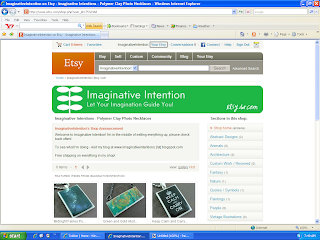
1.) Click on “Your Etsy” at the top of the screen.
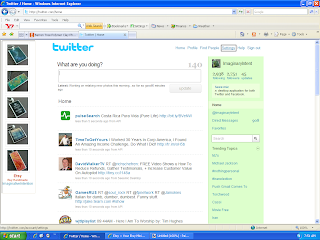
6.) Open Twitter. Select “Settings” at the top of the page.
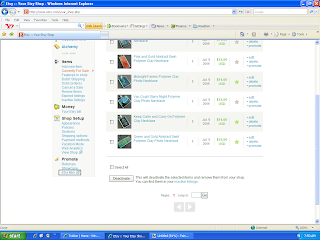
2.) Scroll down to the bottom of the page, and click on “Etsy Mini”.
3.)
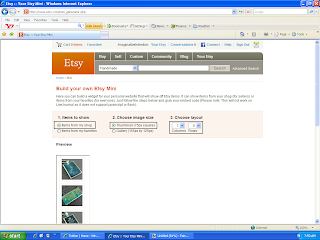
- Under “Items to Show” – select “Items from my shop”.
- Under “Choose Image Size” – select “Thumbnail (75px square)”
- Under “Items to Show” – select “Items from my shop”.
- Under “Choose Image Size” – select “Thumbnail (75px square)”
- Under “Choose Layout” – select “1” and “5”
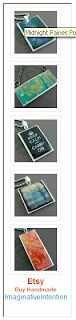
4.) Scroll down, your Etsy mini should appear underneath the option selection section. Make sure you can see your entire Etsy mini on screen. Using your keyboard, select Ctrl + Print Screen. You have just copied the entire screen.
5.) Open your image editing software program. Hit Paste. Your Etsy mini should appear on screen. Crop the image. Save the image.
6.) Open Twitter. Select “Settings” at the top of the page.
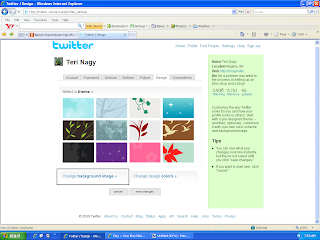
7.) Select “Design”.

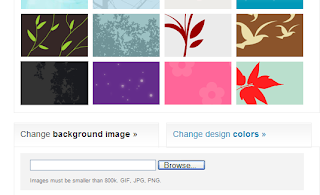
8.) Choose “Change Background Image”.
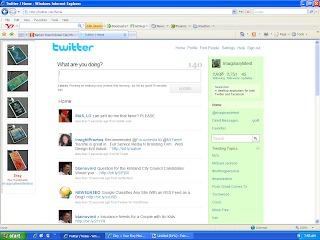 11.) VIOLA! You should have a new Twitter background of your Etsy images.
8.) Choose “Change Background Image”.
9.) Select “Browse”. Choose your Etsy mini image that you just saved. Select open.
10.) Select “Save Changes”.
11.) VIOLA! You should have a new Twitter background of your Etsy images.
Need Craft Show Display Ideas?
Ok, so I've been mulling over the idea of getting involved in local craft shows BUT honestly the idea of creating a great display scares me! I'm terrified that all I'm going to be to come up with is a flat white table with my jewelry strewn everywhere :(
So, I was searching on google for ideas when I came across the absolute best source for ideas with pictures (pictures being essential)! You know what it was - FLICKR! - if you type in
- craft show
- craft display
- craft fair
- art show
- art fair
- jewelry display
- etc
It brings up hundreds of pictures of craft shows and specific display ideas! It's fabulous!
Anyway, just thought I would share!
Flickr = A Promotional Tool?

As I posted earlier, one of the big keys to success on Etsy is to promote yourself outside of Etsy. That means outside advertising, it doesn’t need to be expensive but you should have at least a basic plan and it should be well thought out.
A lot of people mention Flickr as a promo tool, and yes, it can be an effective one at that! HOWEVER, right in Flickr rules and regulations, it states that Flickr is not meant for commercial use! Meaning, if you’re a business and you want to use them, you have to follow their rules! What are their rules, you ask? Here they are right here and if you don’t play by their rules, your account will be deleted:
The rule of thumb is that you can have one link on your profile page to a commercial webpage.
You cannot have tags, descriptions, titles, or comments that indicate that an item is for sale or where to buy it.Having a watermark across the image that is a commercial URL will also cause accounts to get in trouble.In addition, if your account is predominantly commercially-oriented images, and gives the impression of being an online catalog, you may find the account deleted.Something else to keep in mind:
Joining Flickr groups is another great promotional tool BUT be careful and make sure to read group descriptions fully and only post in appropriate groups with relevant photos.
- Posting against the group rules can get your account in hot water.
Flickr is about passive marketing, meaning you can put up pictures of you, your work, your studio, any craft shows you attend, how you create, your personal photos, etc. It’s all about sharing yourself through your photos. It’s not about, ‘look at this, it’s for sale’!
All in all, follow the rules and you’ll have a fun, free way to promote your shop!
For the all the official rules and regulations, click here:
http://www.flickr.com/guidelines.gne
Subscribe to:
Posts (Atom)
