


Showing posts with label building. Show all posts
Showing posts with label building. Show all posts
Having trouble with tags, tiles, and keywords?
Are you having trouble choosing those perfect tags or writing a captivating, informational titles? Well, really, who isn't!
I'm in the process of redoing my tags and titles, so that I can basically get the most bang for my buck. I've been reading through articles and websites and compiling relevant info to use. I figured there was probably others out there with my same dilema so I figured I would share the info I've found!
Etsy Storque Articles:
- http://www.etsy.com/storque/how-to/guidelines-tips-tagging-on-etsy-281/
- http://www.etsy.com/storque/how-to/seller-workshop-recap-tags-titles-descriptions-and-most-rele-4090/
Free Tag Suggestion Search Engine:
- http://craftweasel.com/TagToolQuery.do
- This free search tool allows you to enter a tag or 2 and it will build a list of suggestions of tags based on the tags other people are using for similiar items!
These 2 were the some of the best pieces of information I've come across so far as I find more, I'll be adding new info!
Good luck!


Offering a coupon or gift certificate on Etsy

A great way to encourage repeat business is through exclusive sales to current customers, event attendees, etc. Unfortunately, Etsy isn't setup to automatically to calculate a discount. So, what do you do?
Option 1:
1.) Give your customer a predetermined code or message (something that you'll remember).
2.) Let them know that they'll need to add it the "Message to Seller" section during checkout.
3.) You can either send them a revised invoice or refund the difference via Paypal.
- When refunding via Paypal, remember to use the "Refund" button at the bottom of the transaction page, otherwise the customer will be charged for accepting the refund.
- When refunding via Paypal, remember to use the "Refund" button at the bottom of the transaction page, otherwise the customer will be charged for accepting the refund.
Option 2:
1.) Have the customer convo you before they purchase, this allows you to adjust the price of the listing for the customer beforehand.
You can also add gift certificates to your shop for current and new customers.
- Remember to add a line in the description, that the gift certificate is accepted in your shop (and not for the entire Etsy site).
Well, I came across a few people with a few questions and I hope I cleared everything up. If anyone has any suggestions or questions, please let me know!
Creating a Twitter Background out of your Etsy Mini
I created this tutorial to walk you through creating an Etsy mini that can be added to your Twitter background!
If you have any problems, or have any questions, please feel free to ask!
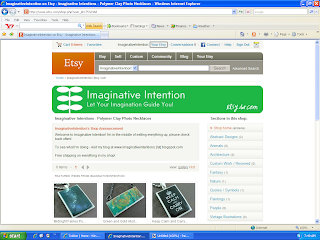
1.) Click on “Your Etsy” at the top of the screen.
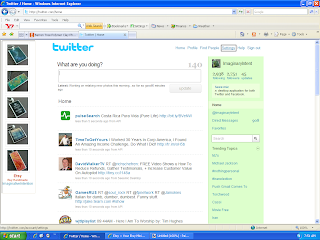
6.) Open Twitter. Select “Settings” at the top of the page.
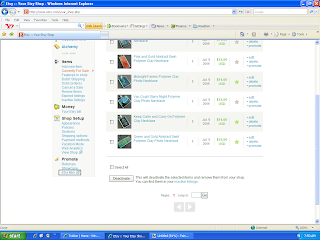
2.) Scroll down to the bottom of the page, and click on “Etsy Mini”.
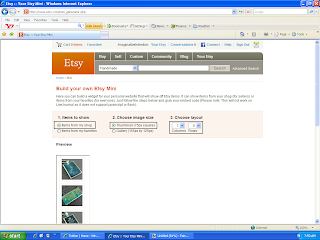
3.)
- Under “Items to Show” – select “Items from my shop”.
- Under “Choose Image Size” – select “Thumbnail (75px square)”
- Under “Items to Show” – select “Items from my shop”.
- Under “Choose Image Size” – select “Thumbnail (75px square)”
- Under “Choose Layout” – select “1” and “5”
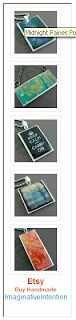
4.) Scroll down, your Etsy mini should appear underneath the option selection section. Make sure you can see your entire Etsy mini on screen. Using your keyboard, select Ctrl + Print Screen. You have just copied the entire screen.
5.) Open your image editing software program. Hit Paste. Your Etsy mini should appear on screen. Crop the image. Save the image.
6.) Open Twitter. Select “Settings” at the top of the page.
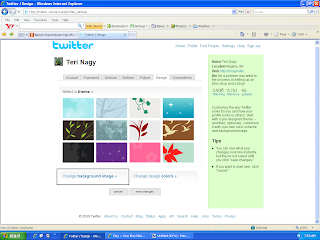
7.) Select “Design”.

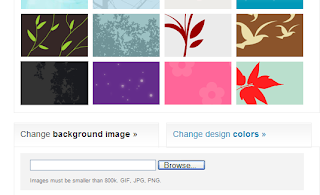
8.) Choose “Change Background Image”.
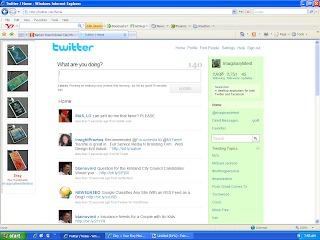 11.) VIOLA! You should have a new Twitter background of your Etsy images.
8.) Choose “Change Background Image”.
9.) Select “Browse”. Choose your Etsy mini image that you just saved. Select open.
10.) Select “Save Changes”.
11.) VIOLA! You should have a new Twitter background of your Etsy images.
Finally finished my new lightbox!


So after a bit of searching, I finally found a light box tutorial that I liked and FINALLY put it together. I can be such a procrastinator! In case anyone was curious this is the tutorial I used:
http://www.pbase.com/wlhuber/light_box_light_tent
It is made out of PVC pipes with a white cloth draped over it. I'm using 100 watt daylight bulbs on tripods, that I picked up at Princess Auto for $40 each.
http://www.pbase.com/wlhuber/light_box_light_tent
It is made out of PVC pipes with a white cloth draped over it. I'm using 100 watt daylight bulbs on tripods, that I picked up at Princess Auto for $40 each.
I've included some pictures of my new setup!
Let me know what you think!
Let me know what you think!
Subscribe to:
Posts (Atom)
