


Showing posts with label promoting. Show all posts
Showing posts with label promoting. Show all posts
Creating a Twitter Background out of your Etsy Mini
I created this tutorial to walk you through creating an Etsy mini that can be added to your Twitter background!
If you have any problems, or have any questions, please feel free to ask!
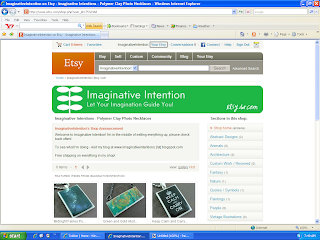
1.) Click on “Your Etsy” at the top of the screen.
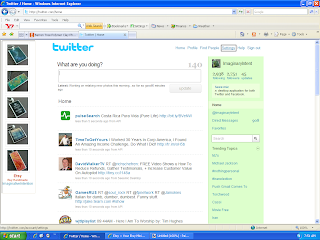
6.) Open Twitter. Select “Settings” at the top of the page.
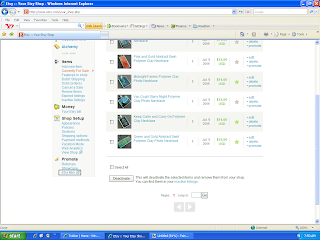
2.) Scroll down to the bottom of the page, and click on “Etsy Mini”.
3.)
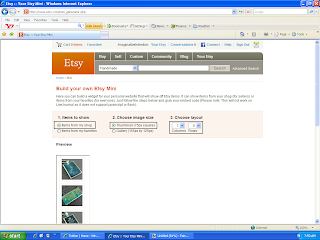
- Under “Items to Show” – select “Items from my shop”.
- Under “Choose Image Size” – select “Thumbnail (75px square)”
- Under “Items to Show” – select “Items from my shop”.
- Under “Choose Image Size” – select “Thumbnail (75px square)”
- Under “Choose Layout” – select “1” and “5”
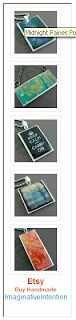
4.) Scroll down, your Etsy mini should appear underneath the option selection section. Make sure you can see your entire Etsy mini on screen. Using your keyboard, select Ctrl + Print Screen. You have just copied the entire screen.
5.) Open your image editing software program. Hit Paste. Your Etsy mini should appear on screen. Crop the image. Save the image.
6.) Open Twitter. Select “Settings” at the top of the page.
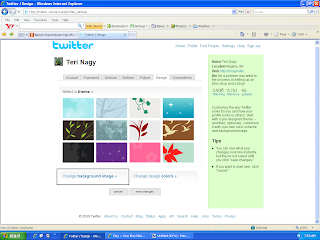
7.) Select “Design”.

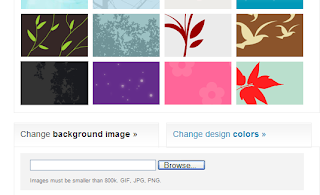
8.) Choose “Change Background Image”.
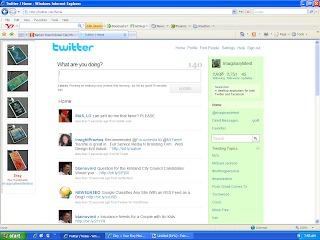 11.) VIOLA! You should have a new Twitter background of your Etsy images.
8.) Choose “Change Background Image”.
9.) Select “Browse”. Choose your Etsy mini image that you just saved. Select open.
10.) Select “Save Changes”.
11.) VIOLA! You should have a new Twitter background of your Etsy images.

Before going to Critiques...
Lately, I’ve been hanging around the Critiques forum on Etsy and I’ve noticed a lot of sellers are going straight to Critiques without really making sure that they could have done everything they should have before asking for a critique.
Why is it important to make your done your part?
When someone is taking just a glance at your shop, all they’re going to see is the big stuff, if you’re missing a banner and your location; they’re going to come back and say you’re missing a banner and your location and move on.
If you’ve got your basics covered, it forces them to look deeper. Do you have a good description, what are your photos really like, are you using all the right tags, could your announcement be shorter/longer/better, etc.
So I put together a list of some of the major things you should make sure you have in place first;
1.) Do you have a banner? Is it well done?
- Your banner is the first thing a potential buyer sees, it should draw them in.
2.) Do you have your location noted?
- You should include your city and state or country – they are a number of cities with the same name in different states and different countries.
3.) Is your avatar relevant?
- You should consider using a photo of your work or a picture of you – to capture people’s attention especially in the forums.
4.) Are your descriptions complete?
- This thread is an invaluable resource concerning all of the things that could/should be included in your description:
- http://www.etsy.com/forums_thread.php?thread_id=6093673&page=1
5.) Do you photos capture your wares as good as they possibly could?
- Check out the hundreds of tutorials on taking photographs, building light boxes, which light bulbs to use, understand the settings on your camera, understand basic photo editing, etc.
- Ask yourself, if you would buy the item just based on the photo?
6.) Are you using all 5 slots for your photographs?
- Capturing the item from every angle, showing it in use, displaying on someone, etc.
7.) Are you using the feature slots for your 3 favorite pieces?
8.) Are you using all of your tags? Are they all relevant? Are you spamming with any of your tags?
9.) Are you adding new items on a regular basis?
10.) Are you promoting yourself on/off of Etsy?
- The forums, Flickr, Twitter, Facebook, My Space, A blog, etc.
- Check out any of the threads on self promotion.
11.) Go in with an open mind!
- Every person has their own point of view, with a critique you'll be able to see through someone's eyes.
12.) Don't use Critiques as just another promotion venue!
- i.e. Look at this ware, what do you think?
This is just a short list of some of the things that need to be analyzed but it’s still a starting point. I wish everyone the best of luck in their Etsy endeavours!
Subscribe to:
Posts (Atom)
