


Showing posts with label advertising. Show all posts
Showing posts with label advertising. Show all posts
TWITTER GIVEAWAY!
 Really who doesn't love free stuff? Especially when it can obtained so easily! Right now, I'm running a Twitter promotion in order to giveaway this necklace:
How it works:
The 1115th RT wins, max 1 RT per hour!
Where do you enter:
Good luck to everyone! I will be posting the winner later!


Finally....
After reading post after post about starting a Facebook fan page. I finally put one together, which was relatively simple. Right now, the link is:
http://www.facebook.com/home.php?#/pages/Imaginative-Intention/149004529324
Apparently, you need to have at least 100 fans before they will allow you to have a personalized URL link like facebook.com/imaginativeintention. So, I'll be attempting to successfully promote it in the near future, so that I can get my custom URL before someone else does!
Anyway, I just wanted to share what I've been doing lately.
Absolutely Brilliant Idea for....the absent minded!

I'm the type of person that can be walking down the street and BAM, 3 completely new ideas pop into my head and then by the time I've make it to the crosswalk, they're all gone!
So after lurking (which sounds kinds of creepy) in the Etsy forums, I came across 1 of the thousands of Etsy tips & tricks threads, someone posted that they keep a journal. Well, I started thinking (I was NOT the type to keep a journal or diary as a kid) BUT if I could remember to write important stuff down....drum rolll...EPHINANY...then I wouldn't lose all of my ideas all the time!
So I ran over to Michael's (with 40% off coupon in hand) and bought a small sketchbook for like $6. Now, I carry it wherever I go (it fits in my purse) and I've written down things like:
- sketched out new ideas (even though I can't draw, I get the idea)
- printed off pictures from tutorials, products I like, supplies, etc
- printed off pictures from tutorials, products I like, supplies, etc
- places I want to try advertising at
- places I want to think about networking with (Facebook, Twitter, EtsyLove, etc)
- new packaging ideas
- useful tips & tricks that I come across
- ways to expand my business (like newsletters, wholesale)
- blog topics that I might want to write about
- things that I like that other sellers are doing
- photography ideas, pictures of how other's have done things I've liked
The list goes on and on, each page has it's own theme, otherwise I would never be able to keep it at all organized.
Anyway, this notebook has been an absolute lifesaver. So I figured I would share the idea!
Let me know, if you decide to try it!
I love this...
Another Etsy seller who is absolutely wonderful, was kind enough to share findings the other day. The program she found is called Animoto.
What is Animoto?
- It is a program that produces TV-quality music videos using your photos in just minutes.
How does it work?
- Choose your photos (about 20)
- Upload your photos to the program (very similiar to uploading photos to your Etsy listings).
- Choose a song.
- Click complete.
The program puts everything together and VOILA, you've just created your first absolutely fabulous 30 second video!
But what does it cost me?
- Well, if you know me, you know that I love free! So, of course this program is absolutely FREE!
What do I do with it now?
- I'm in the process of looking for places that I can advertise add my new video. So far, I've found Flickr, YouTube, Facebook fan page, and my blog but I'm still searching!
So go forth and create!
Go Daddy + Facebook = $50 free ad credit!

I've been humming and hawing about purchasing advertising on Facebook, I've been heard great success stories and horrible flops! Someone mentioned how they received a free Facebook ad credit and since then, I figured I would wait until another ad credit popped up and it finally did!
If you purchase a domain name through Go Daddy for $9.99, you can receive a $50 Facebook ad credit!
Expiry: September 30, 2009
Tip: Even if you aren't thinking about starting up a website, you can just simply redirect to your Etsy site or you can make sure you have it available for future use!
TERMS & CONDITIONS: The promotional credit must be applied to a new Facebook Advertiser account within 15 days of creating such account and is valid only for purchase of advertising through Facebook's online advertising system in the United States, Canada, United Kingdom and Australia. May only be redeemed by Facebook users who purchase Go Daddy qualifying products. Advertisers will be charged for advertising that exceeds the promotional credit. Advertisers will need to suspend their ads if they do not wish to receive additional charges beyond the free credit amount. Subject to ad approval, valid registration and acceptance of the generally applicable Facebook Advertising Terms and Conditions. The promotional credit is non-transferable and may not be sold or bartered. Offer may be revoked at any time for any reason by Facebook. One promotional credit per individual. Promotional credit equals $50.00 USD which can be applied to the purchase of advertising through Facebook's online advertising system. A $1.00 activation fee is charged separately. Offer valid only for sign ups using the code or URL link received upon purchase of Go Daddy shared hosting, virtual/dedicated hosting, WebSite Tonight®, Quick Shopping Cart®, Quick Blogcast - all plans qualify. Expires 90 days from date the customer sets up their account with Facebook. Should you purchase more than one Go Daddy product that qualifies for the above offer, you will receive the highest eligible credit value. Subsequent purchases do not qualify for additional Facebook credit.
Has Your Treasury Been Featured on the Front Page?
I recently received a question asking if there was a way to find out if the treasury you curatored (created) was posted to the Front Page. After a few minutes of double checking my theory, I notified them that in fact there was a way. How, you ask? Well, these are the steps:
1.) Go to the Etsy Front Pager's Photostream on Flickr: http://www.flickr.com/photos/28488923@N05/
- This is a Flickr group that collects and posts photographs of all of the treasuries that were featured on the Front Page!
- Tip: If you've been featured and have a blog, you can copy & paste the treasury photo from the Etsy Front Pager's group and post a write up in your blog, letting others know you've been featured on the Front Page!
2.) Go to the search bar at the top right hand corner and enter your Etsy username (i.e. ImaginativeIntention). Click search.
3.) The search will bring up any Front Page treasuries you were featured on and if your a curator of any of the front page treasuries.
Well, I hope that helps anyone else who might have been wondering about it.
If anyone has any questions, please feel free to ask!
Creating a Twitter Background out of your Etsy Mini
I created this tutorial to walk you through creating an Etsy mini that can be added to your Twitter background!
If you have any problems, or have any questions, please feel free to ask!
1.) Click on “Your Etsy” at the top of the screen.
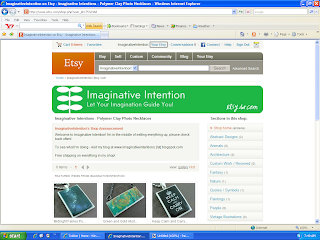
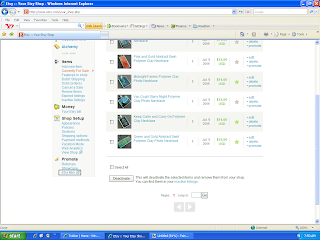
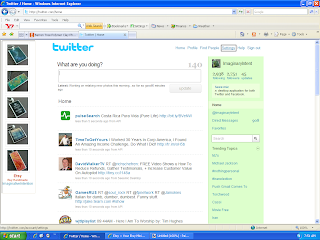
6.) Open Twitter. Select “Settings” at the top of the page.
2.) Scroll down to the bottom of the page, and click on “Etsy Mini”.
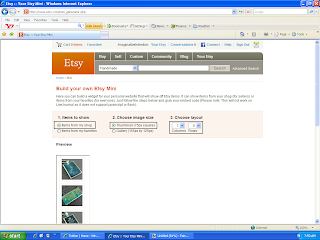
3.)
- Under “Items to Show” – select “Items from my shop”.
- Under “Choose Image Size” – select “Thumbnail (75px square)”
- Under “Items to Show” – select “Items from my shop”.
- Under “Choose Image Size” – select “Thumbnail (75px square)”
- Under “Choose Layout” – select “1” and “5”
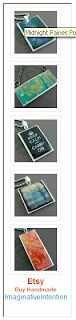
4.) Scroll down, your Etsy mini should appear underneath the option selection section. Make sure you can see your entire Etsy mini on screen. Using your keyboard, select Ctrl + Print Screen. You have just copied the entire screen.
5.) Open your image editing software program. Hit Paste. Your Etsy mini should appear on screen. Crop the image. Save the image.
6.) Open Twitter. Select “Settings” at the top of the page.
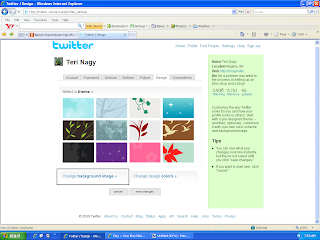
7.) Select “Design”.

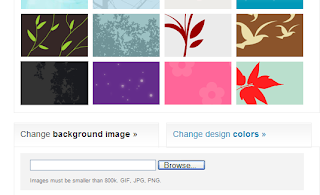
8.) Choose “Change Background Image”.
 11.) VIOLA! You should have a new Twitter background of your Etsy images.
8.) Choose “Change Background Image”.
9.) Select “Browse”. Choose your Etsy mini image that you just saved. Select open.
10.) Select “Save Changes”.
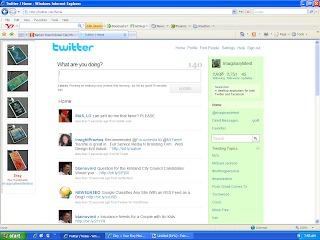
11.) VIOLA! You should have a new Twitter background of your Etsy images.
Need Craft Show Display Ideas?
Ok, so I've been mulling over the idea of getting involved in local craft shows BUT honestly the idea of creating a great display scares me! I'm terrified that all I'm going to be to come up with is a flat white table with my jewelry strewn everywhere :(
So, I was searching on google for ideas when I came across the absolute best source for ideas with pictures (pictures being essential)! You know what it was - FLICKR! - if you type in
- craft show
- craft display
- craft fair
- art show
- art fair
- jewelry display
- etc
It brings up hundreds of pictures of craft shows and specific display ideas! It's fabulous!
Anyway, just thought I would share!
Flickr = A Promotional Tool?

As I posted earlier, one of the big keys to success on Etsy is to promote yourself outside of Etsy. That means outside advertising, it doesn’t need to be expensive but you should have at least a basic plan and it should be well thought out.
A lot of people mention Flickr as a promo tool, and yes, it can be an effective one at that! HOWEVER, right in Flickr rules and regulations, it states that Flickr is not meant for commercial use! Meaning, if you’re a business and you want to use them, you have to follow their rules! What are their rules, you ask? Here they are right here and if you don’t play by their rules, your account will be deleted:
The rule of thumb is that you can have one link on your profile page to a commercial webpage.
You cannot have tags, descriptions, titles, or comments that indicate that an item is for sale or where to buy it.Having a watermark across the image that is a commercial URL will also cause accounts to get in trouble.In addition, if your account is predominantly commercially-oriented images, and gives the impression of being an online catalog, you may find the account deleted.Something else to keep in mind:
Joining Flickr groups is another great promotional tool BUT be careful and make sure to read group descriptions fully and only post in appropriate groups with relevant photos.
- Posting against the group rules can get your account in hot water.
Flickr is about passive marketing, meaning you can put up pictures of you, your work, your studio, any craft shows you attend, how you create, your personal photos, etc. It’s all about sharing yourself through your photos. It’s not about, ‘look at this, it’s for sale’!
All in all, follow the rules and you’ll have a fun, free way to promote your shop!
For the all the official rules and regulations, click here:
http://www.flickr.com/guidelines.gne
Etsy Confession: Advice of the Day
So I have 2 years of Etsy selling experience and I was thinking of some of the mistakes I made in the beginning. I figured I should pass along some of the my "mistakes" in the hopes of helping others to avoid those mistakes.
1.) DON'T list your products on Etsy all at one time!
Why:
When your item is added to your Etsy shop, it ends up at the top of the search for a few minutes and then disappears into the search pages. Those first few minutes that your item is up there, it will be in the first few items the buyer sees. If you list a few times each day, different buyers will see your items at different times. Increasing your exposure and possiblity of selling.
2.) Always fill out your policies page!
Why:
If you have a problem with a buyer who disagrees with you about how something is supposed to be paid for, or how/when something is supposed to ship, you will need something to reference to show how and when that something is supposed to be done. Otherwise, you'll both be arguing over who is right without a good, standard solution. Especially when it comes to return policies.
3.) You can't just list your wares and sit back and wait for the sales to pour in, you need to do outside of Etsy promotion, here's a few suggestions:
a) Spend at least 1-2 hours in the forums about 6 days a week, reading and posting.
b) Started a blog and post almost every day.
c) Go to forums on other websites, google, yahoo, anywhere you can think of and post there making sure your store link is in your post (but don't just post to spam).
d) Get business cards and put them in all the packages you send to customers.
e) Start a flickr account.
f) Include in your packages to current customers, coupons offering discounts on future orders.
g) Make sure your store link is in every email you send.
h) Sign up for outside advertising (Project Wonderful, Google Ads, Facebook, etc)
i) Read other people's blogs and post messages on them, they will reply and notice your blog and sometimes post a link to yours.
j) Join an Etsy blog ring, so other people also find your blog
These are just a couple of things that I've thought about lately. I'll be adding more, as I think about it! I hope someone can use some of this to help themselves become more successful!
Subscribe to:
Posts (Atom)
