


Showing posts with label creating. Show all posts
Showing posts with label creating. Show all posts
I've playing around with some things lately..


Sadly, I've sort of been neglecting my blog lately. It just seems like if its not one thing, it's another. Definitely been keeping me busy and sometimes not so sane! Over the next week, I'm hoping to add another 25 pendants to my shop, so please keep an eye for these new styles!
Soon I hope to be launching 2 different styles of pendants, one using stainless steel and sterling silver, and the other will be made from wood. I'm pretty excited about that but I'm not quite ready to put them in my shop yet!
In the meantime, I wanted to share a set of ceramic tile coasters I made. I saw something similiar on a website but the just the cost of shopping to me was almost $20. So I set my 'little' brain in motion and this is what happened! If anyone wants to know how I did it, feel free to contact me!
Anyway, I hope everyone is having a wonderful day!


Creating a Twitter Background out of your Etsy Mini
I created this tutorial to walk you through creating an Etsy mini that can be added to your Twitter background!
If you have any problems, or have any questions, please feel free to ask!
1.) Click on “Your Etsy” at the top of the screen.
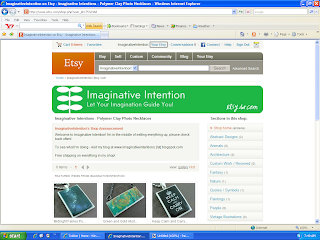
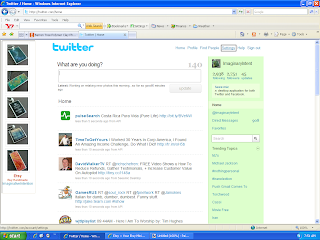
6.) Open Twitter. Select “Settings” at the top of the page.
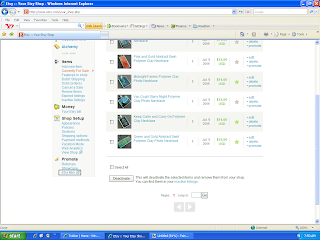
2.) Scroll down to the bottom of the page, and click on “Etsy Mini”.
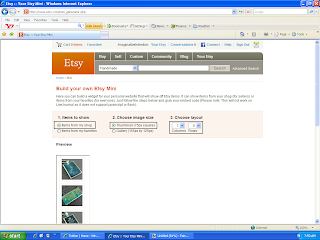
3.)
- Under “Items to Show” – select “Items from my shop”.
- Under “Choose Image Size” – select “Thumbnail (75px square)”
- Under “Items to Show” – select “Items from my shop”.
- Under “Choose Image Size” – select “Thumbnail (75px square)”
- Under “Choose Layout” – select “1” and “5”
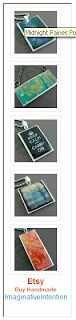
4.) Scroll down, your Etsy mini should appear underneath the option selection section. Make sure you can see your entire Etsy mini on screen. Using your keyboard, select Ctrl + Print Screen. You have just copied the entire screen.
5.) Open your image editing software program. Hit Paste. Your Etsy mini should appear on screen. Crop the image. Save the image.
6.) Open Twitter. Select “Settings” at the top of the page.
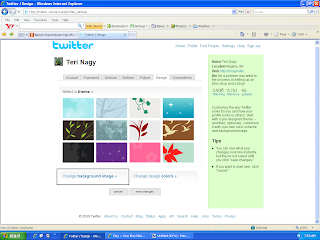
7.) Select “Design”.

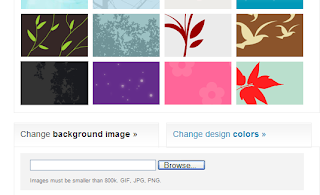
8.) Choose “Change Background Image”.
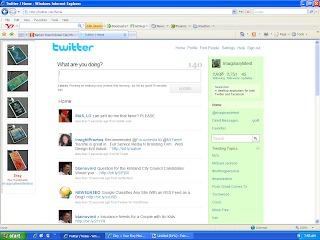 11.) VIOLA! You should have a new Twitter background of your Etsy images.
8.) Choose “Change Background Image”.
9.) Select “Browse”. Choose your Etsy mini image that you just saved. Select open.
10.) Select “Save Changes”.
11.) VIOLA! You should have a new Twitter background of your Etsy images.
So...yes, it's completely barren right now, BUT...
Welcome, thanks for coming, please pull up a chair, sit down, feel free to grab a drink or a snack, and stay for a while...
Where oh where do I begin, well, my name is Teri! I created this blog to hopefully (keyword being hopefully) put into words, my artistically inspired ramblings. I'm thinking about "focusing" on the wondrous world of arts & crafts, in the hopes of dealing with my absolute, unyielding obsession of creating both beautiful yet functional pieces that anyone would love or at least appreciate (even if its from a distance - you know the whole, 'well its not something I would personally like but I could see how someone else might like it' or the less tactful, 'what the hell were you thinking'!
I'm also a HUGE fan of Etsy and the Handmade Movement! If you have a chance, you NEED to check Etsy out whenever you have a chance! I can't even begin to explain the amazing pieces you can find.
I've tried selling my pieces on Etsy but unfortunately, I don't think I have the discipline to create the same pieces over and over again (short attention span!). So I decided because of my obsession with learning to create new things (I'm the type that sees something I like and then brain starting churning, I could make that), and I thought I would start sharing some of things I've created and show others how I did it!
If anyone has any requests, comments, thoughts, feel free to let me know!
Subscribe to:
Posts (Atom)
