


Showing posts with label promotional. Show all posts
Showing posts with label promotional. Show all posts
Creating a Twitter Background out of your Etsy Mini
I created this tutorial to walk you through creating an Etsy mini that can be added to your Twitter background!
If you have any problems, or have any questions, please feel free to ask!
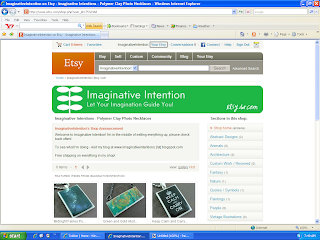
1.) Click on “Your Etsy” at the top of the screen.
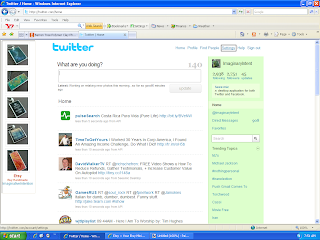
6.) Open Twitter. Select “Settings” at the top of the page.
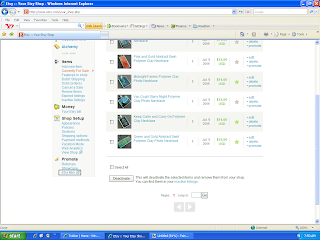
2.) Scroll down to the bottom of the page, and click on “Etsy Mini”.
3.)
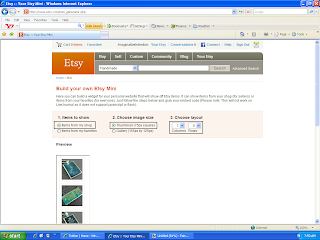
- Under “Items to Show” – select “Items from my shop”.
- Under “Choose Image Size” – select “Thumbnail (75px square)”
- Under “Items to Show” – select “Items from my shop”.
- Under “Choose Image Size” – select “Thumbnail (75px square)”
- Under “Choose Layout” – select “1” and “5”
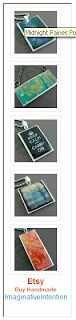
4.) Scroll down, your Etsy mini should appear underneath the option selection section. Make sure you can see your entire Etsy mini on screen. Using your keyboard, select Ctrl + Print Screen. You have just copied the entire screen.
5.) Open your image editing software program. Hit Paste. Your Etsy mini should appear on screen. Crop the image. Save the image.
6.) Open Twitter. Select “Settings” at the top of the page.
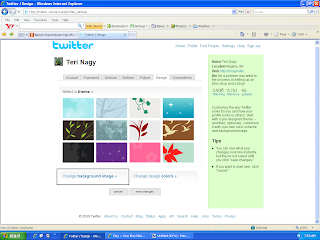
7.) Select “Design”.

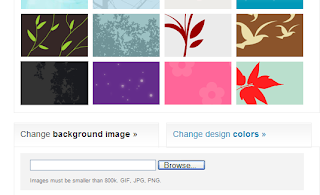
8.) Choose “Change Background Image”.
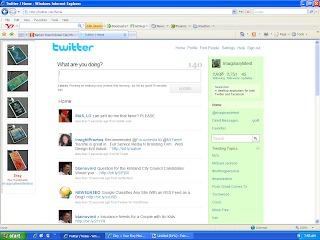 11.) VIOLA! You should have a new Twitter background of your Etsy images.
8.) Choose “Change Background Image”.
9.) Select “Browse”. Choose your Etsy mini image that you just saved. Select open.
10.) Select “Save Changes”.
11.) VIOLA! You should have a new Twitter background of your Etsy images.

Flickr = A Promotional Tool?

As I posted earlier, one of the big keys to success on Etsy is to promote yourself outside of Etsy. That means outside advertising, it doesn’t need to be expensive but you should have at least a basic plan and it should be well thought out.
A lot of people mention Flickr as a promo tool, and yes, it can be an effective one at that! HOWEVER, right in Flickr rules and regulations, it states that Flickr is not meant for commercial use! Meaning, if you’re a business and you want to use them, you have to follow their rules! What are their rules, you ask? Here they are right here and if you don’t play by their rules, your account will be deleted:
The rule of thumb is that you can have one link on your profile page to a commercial webpage.
You cannot have tags, descriptions, titles, or comments that indicate that an item is for sale or where to buy it.Having a watermark across the image that is a commercial URL will also cause accounts to get in trouble.In addition, if your account is predominantly commercially-oriented images, and gives the impression of being an online catalog, you may find the account deleted.Something else to keep in mind:
Joining Flickr groups is another great promotional tool BUT be careful and make sure to read group descriptions fully and only post in appropriate groups with relevant photos.
- Posting against the group rules can get your account in hot water.
Flickr is about passive marketing, meaning you can put up pictures of you, your work, your studio, any craft shows you attend, how you create, your personal photos, etc. It’s all about sharing yourself through your photos. It’s not about, ‘look at this, it’s for sale’!
All in all, follow the rules and you’ll have a fun, free way to promote your shop!
For the all the official rules and regulations, click here:
http://www.flickr.com/guidelines.gne
A little something extra...
Well, I've been reading a lot lately on the Etsy forums from other sellers who are debating what to include in their packages (that are shipped to their customers). A little something extra, if you please...I've heard tons of ideas in the hopes of a proper thank you to the customer and of course, the hope of drumming up some new/repeat business. Here are some of the best ideas I came across and some of the ones I'm hoping to employ when I start selling again:
1.) Glass Marble Magnets
- They're really cheap and easy to make. I'm thinking about making ones to match some of my pendants.
- Tutorial: http://www.flickr.com/photos/honeygirl_studio/sets/72157594472276952/
2.) Bookmarks
- I was originally thinking about creating bookmarks but I'm still debating what it will cost.
3.) Samples
- When I'm creating new lines of pendants, I'm thinking about possibly including an extra pendant.
- If your wares come in a variety of scents, colors, etc, you could include a little sample pack in with their purchase, it will give them something to smell/feel rather than buying just based on a description.
4.) Promo items with my logo
- I was wondering and doing some basic research on sending promo materials like business cards, match books, note cards, buttons, etc in the package with my logo BUT when I receive similiar stuff, I tend to toss it out, so I'm still thinking on this one.
5.) Coupons
- Come on, everyone loves coupons! Free shipping, Buy 2 Get 1 Free, $5 off $25 purchase. Whatever tempts you will probably tempt someone else. If you can do it and it makes sense profit wise go ahead!
Things to Remember When Including Freebies:
- Pay attention to weight, you don't want to be adding to the overal weight which translates to upping the postage cost.
- Try to keep your freebies "cheap", that doesn't mean they have to look cheap but you need to make sure they're not eating into your profit margin too much.
- DON'T include anything edible because of allergies, medical conditions, the heat can melt the food and ruin the rest of package, and you tell your kids not to eat candy from strangers, so why would you?
- Be careful, when shipping to other countries, each country has their own regulations, you don't want your shipment confisicated because of a problem with a freebie!
- Try to keep your freebie relevant to what your selling, it will be easier for the customer to recall who/what/why/when/where they got it from.
Something else to keep in mind, no matter how great the freebie is, the best way to keep a customer happy and encourage that customer to come back is through:
a.) A great product at a good price!
b.) Awesome customer service, before & after the sale!
c.) Professional packing!
Subscribe to:
Posts (Atom)
